Book a demo
Shift checklists for restaurants

You can't manage what you can't see.

Heard puts every opening, kitchen, hygiene and closing check from every outlet on one screen. Each task has a name, a time and a photo where it matters, and a manager who called it back.

Every task, called back.

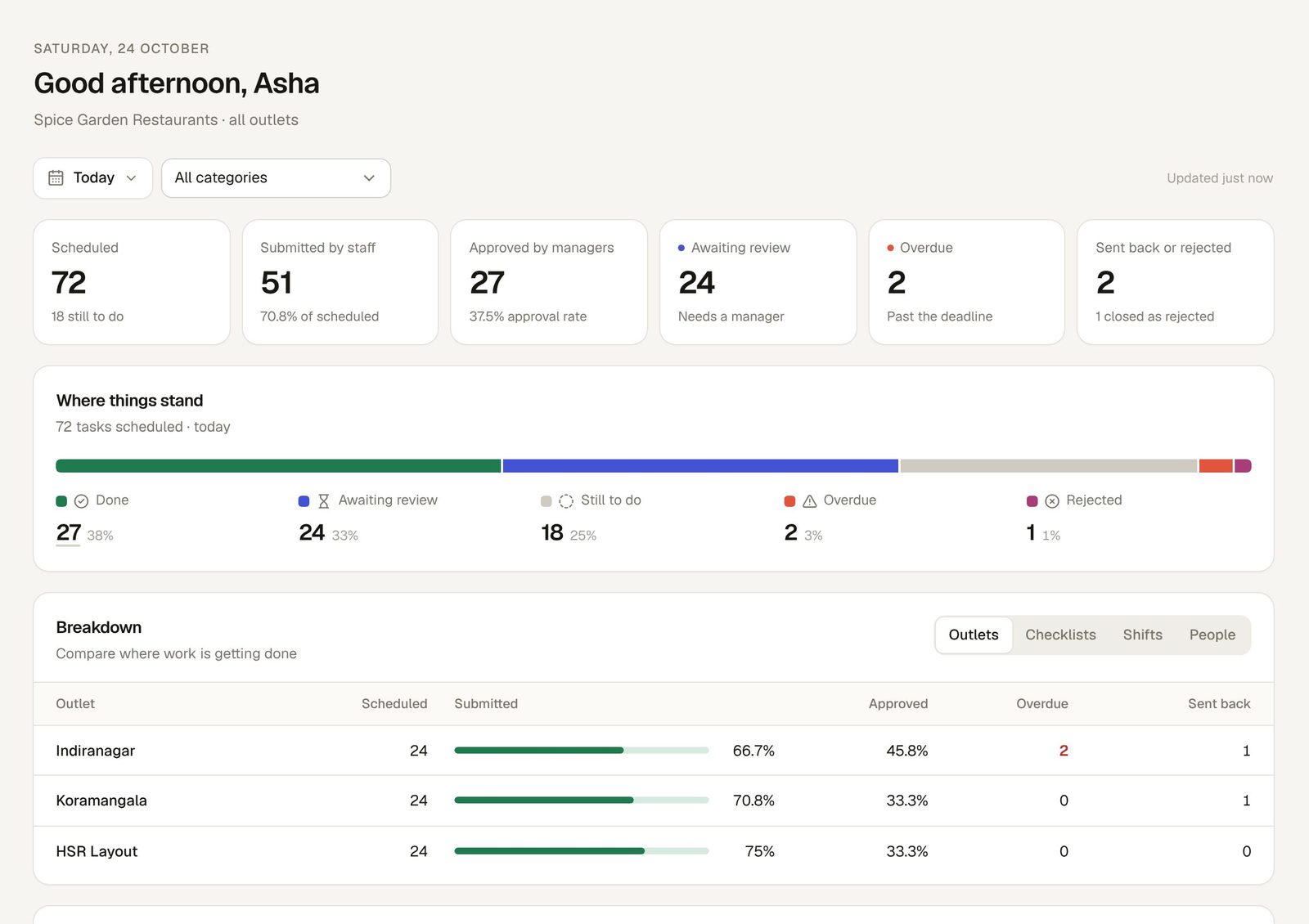
Owner dashboard · all outlets · today
Heard owner dashboard: 72 tasks scheduled today across three outlets, 51 submitted by staff, 27 approved by managers, 24 awaiting review, 2 overdue, with a breakdown by outlet
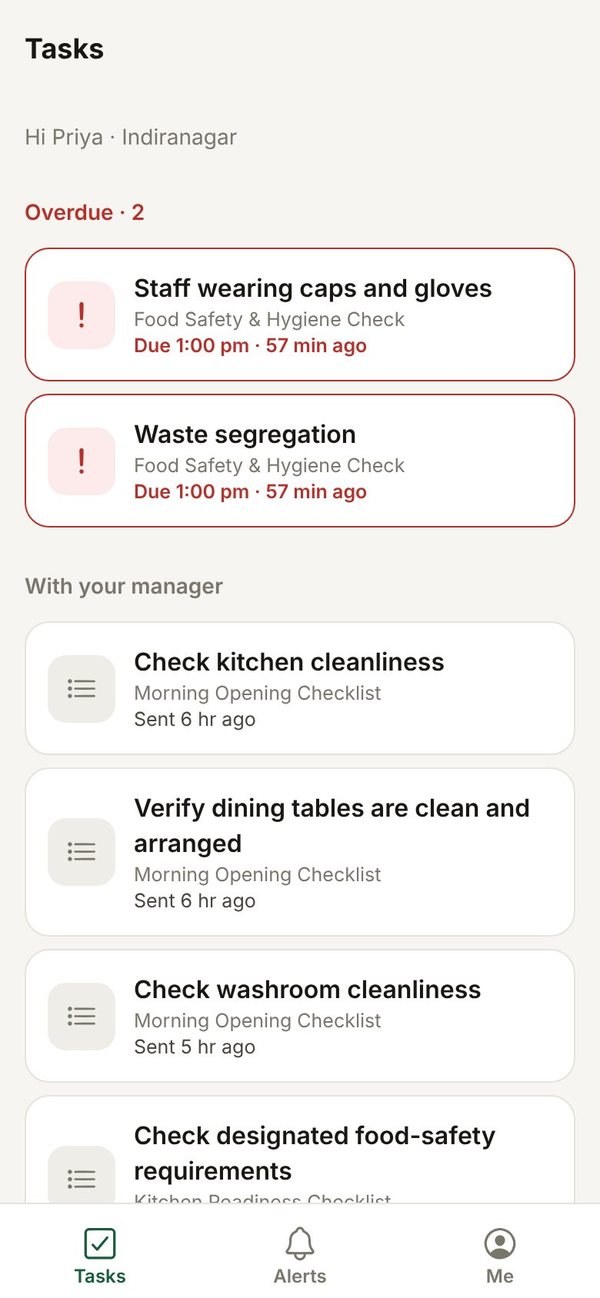
Staff task list on the phone with two overdue tasks and tasks waiting for the manager
NameWho did the task, signed in with their own PIN
TimeServer time on every submission, not the phone's clock
PhotoIn-app camera or gallery, labelled so the reviewer can tell
Called backA manager approves it, or sends it back with a reason
Why "Heard"

In a kitchen, nothing counts until someone says heard.

When the chef calls an order, the line answers "Heard": I've got it, it's mine, it will get done. Heard does the same for every task that isn't on an order ticket. The cold room, the hand-wash station, the morning puja, the closing sweep. Someone owns it, someone does it, and the manager sees it called back.

ChefCold room check. Who's got it?
RaviHeard.
7:42 AM · Cold room cleaned and sealed · photo attached · Ravi K. · approved by Meera I. 7:58 AM
Heard Open Due in 15 min Overdue 20 min
How it works

From the list to the owner's screen in four steps.

01

Set the lists

Start from 13 ready-made restaurant checklists or build your own. Choose who does each task, by what time, and whether it needs a photo or a manager's approval.

02

The team calls it back

Staff sign in on their phone with a 6-digit PIN, see today's tasks, take the photo in the app and submit. Miss the deadline and the task turns red.

03

Managers check it

Approve, send it back with a reason, or reject. Nobody can approve their own work, and every step is kept.

04

You see every outlet

One screen for all your outlets: what's done, what's waiting for a manager, what's overdue, and who signed it off.

The product

Built for the pass, the floor and the owner's phone.

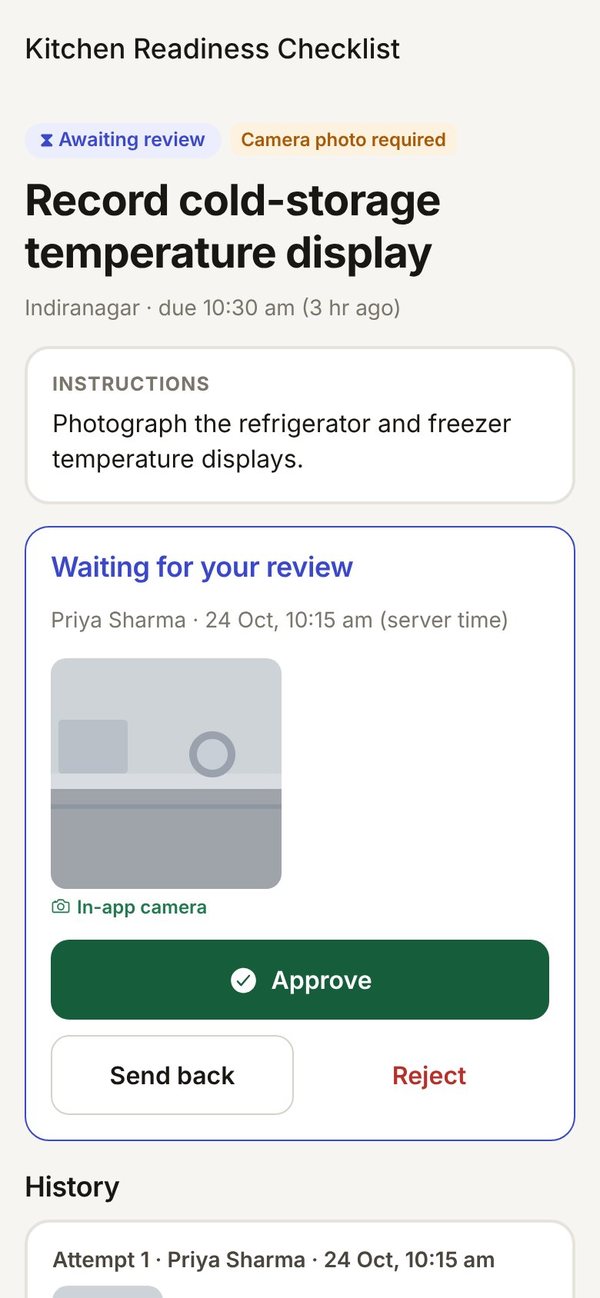
Photo proof the manager actually checks.

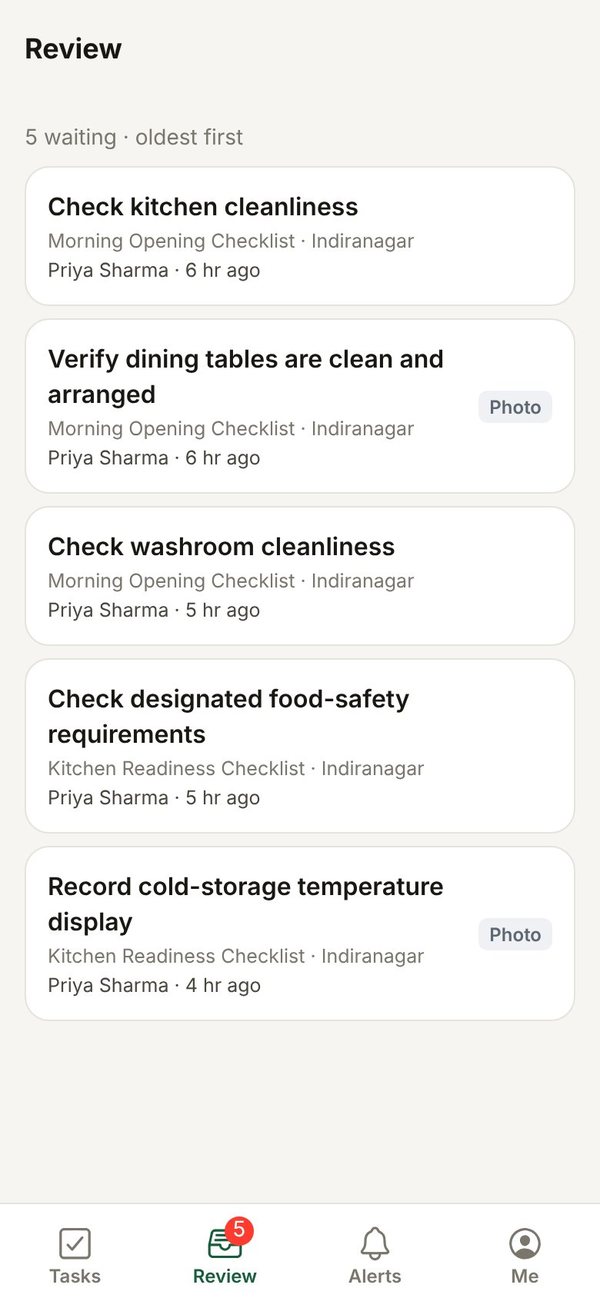
Every photo lands in a review queue, oldest first. The manager sees the photo, who took it, when, and whether it came from the in-app camera or the gallery, then calls it back.

  • Camera-only tasks refuse gallery photos, so the morning puja photo is taken on the spot
  • Send back with a reason; the redo comes back as a new attempt, with the first one kept
  • Photos are private to your restaurant and open only for people allowed to see them
Review · Kitchen Readiness Checklist
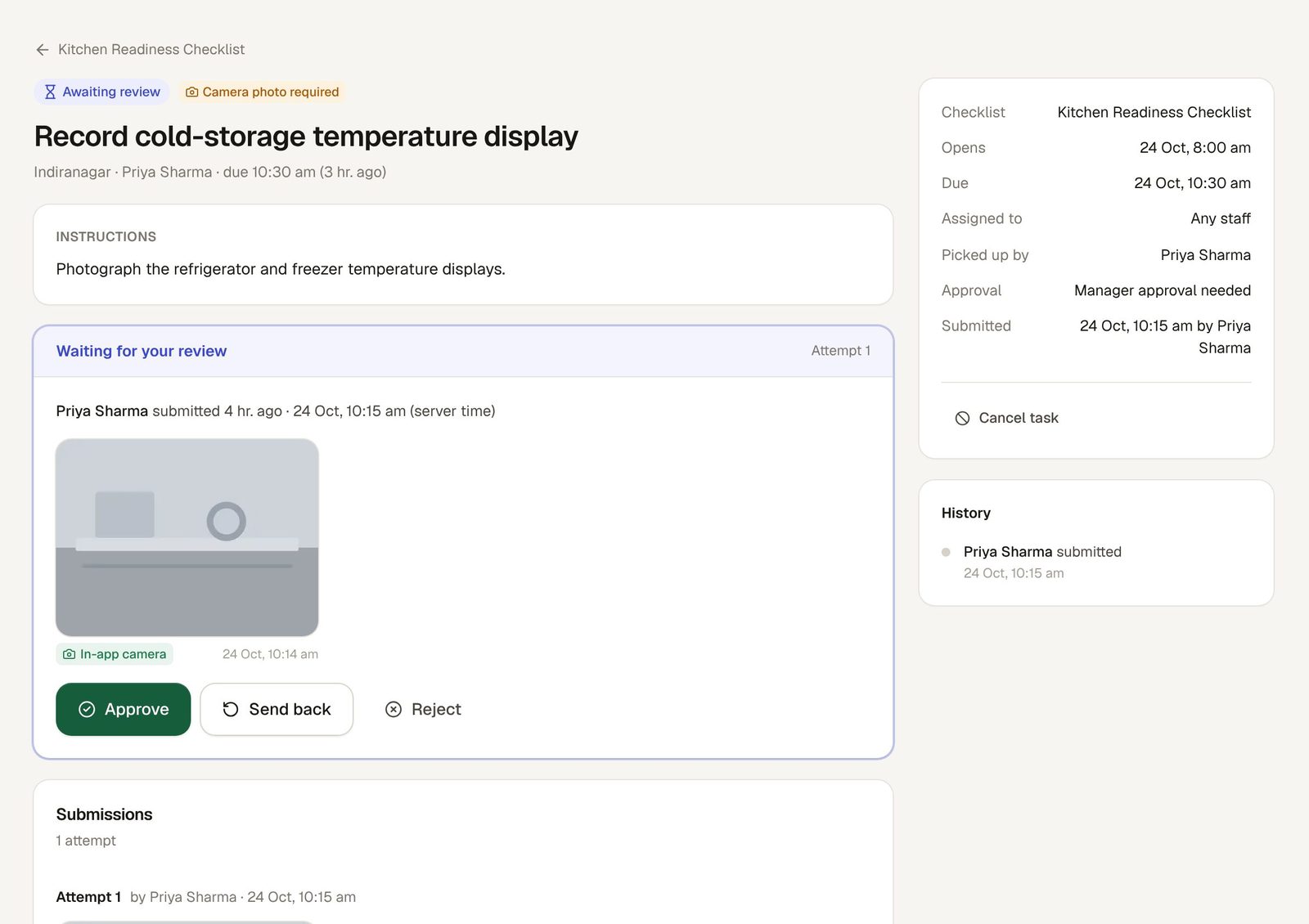
A manager reviewing a cold-storage temperature photo taken with the in-app camera, with Approve, Send back and Reject buttons

Every outlet, one screen.

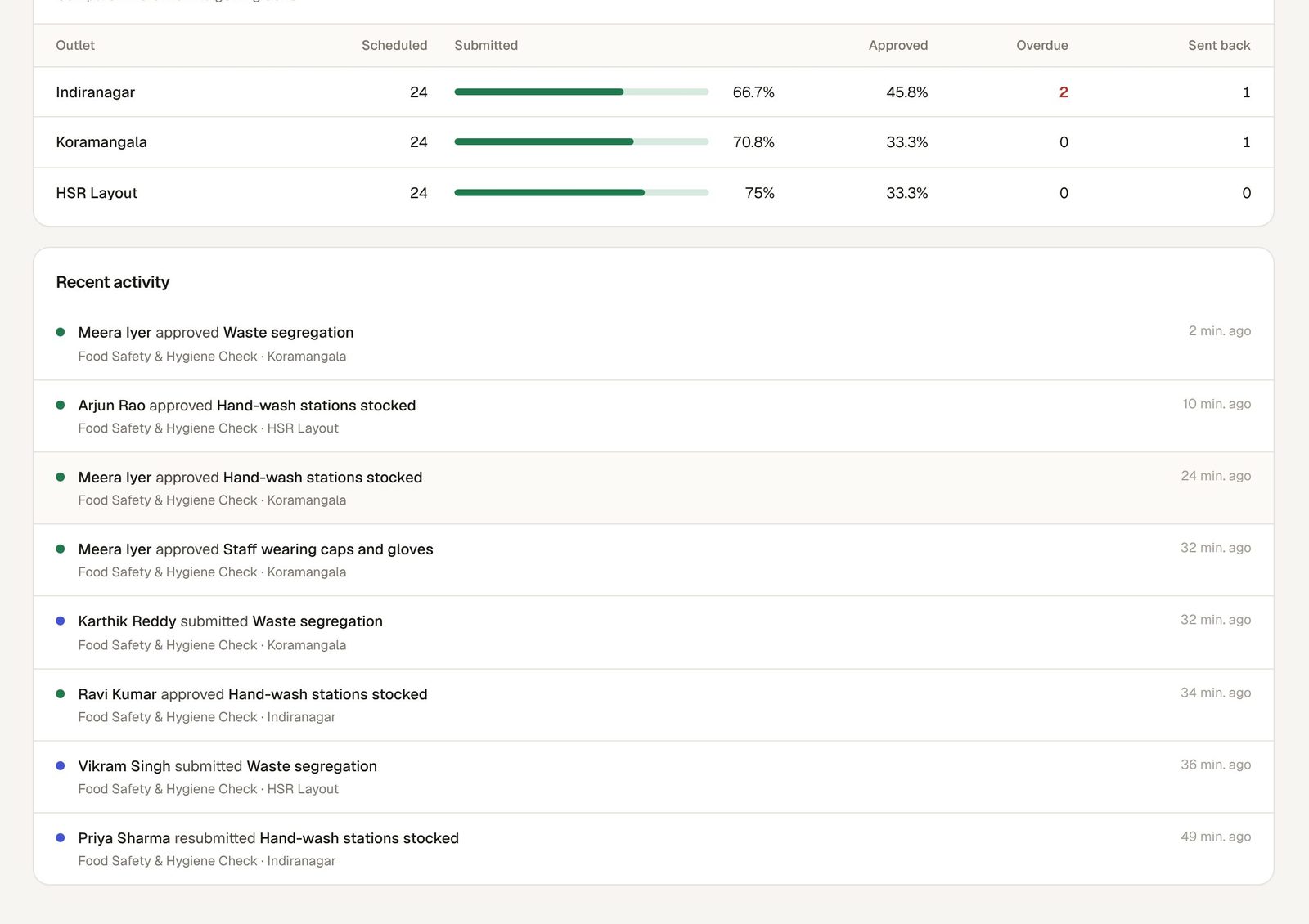
Scheduled, submitted by staff, approved by managers, waiting, overdue and sent back, for today or any date range. Tap any number to see the exact tasks behind it.

  • Compare outlets, checklists, shifts and people side by side
  • Rejected work is never counted as approved
  • Recent activity shows who submitted and who approved, as it happens
Owner dashboard · outlets
Outlet comparison for Indiranagar, Koramangala and HSR Layout, followed by recent approvals and submissions

Today, at a glance.

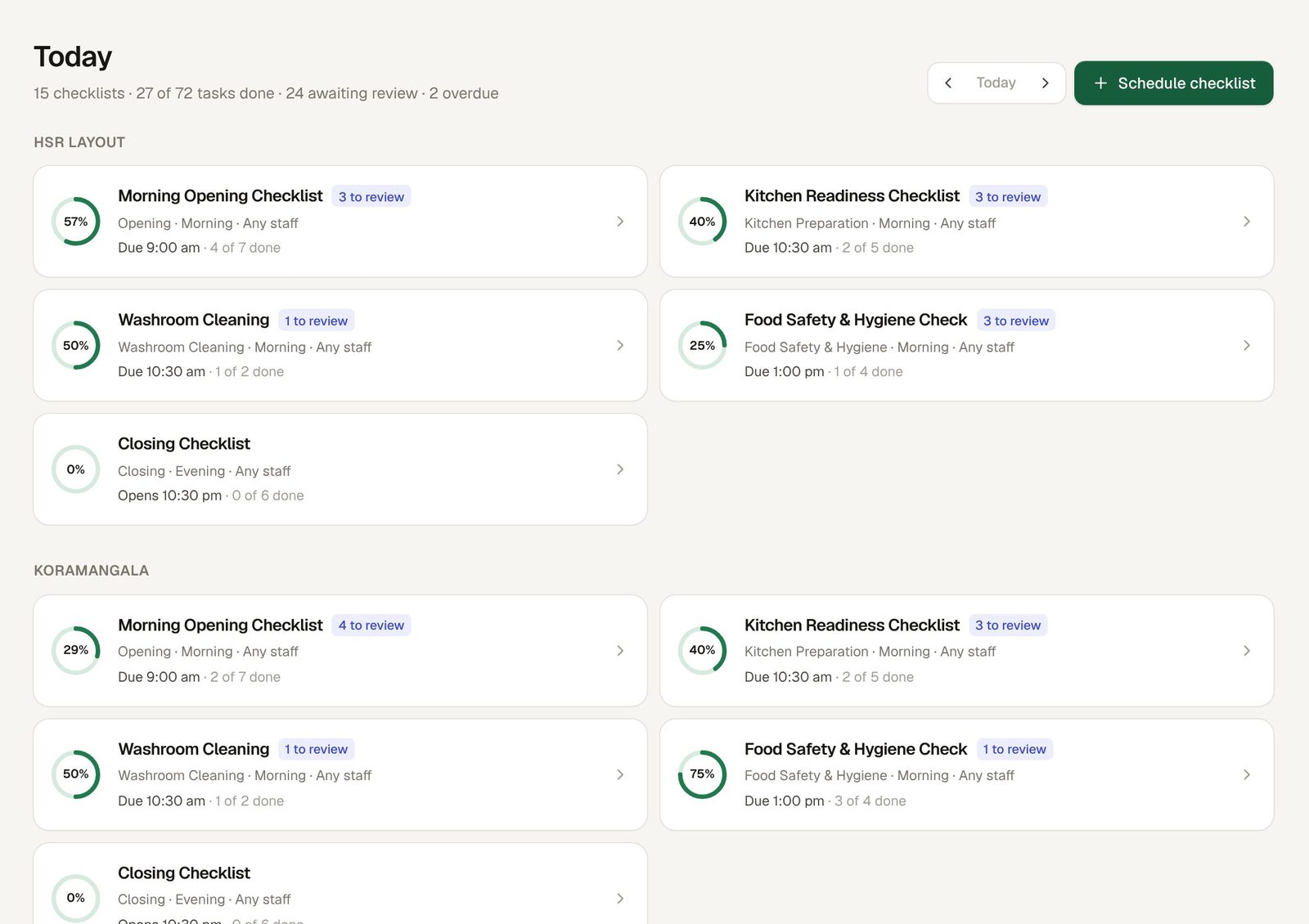
Every checklist at every outlet with its progress, its deadline and how many tasks wait for review. Late work turns red, and repeated misses go up to the manager.

  • Alerts in the app and by push notification when a deadline passes
  • Overnight shifts handled: a closing list due at 12:30 AM belongs to the right day
Today · all outlets
Today view with checklist cards for each outlet showing completion and items to review

On the floor, on the phone.

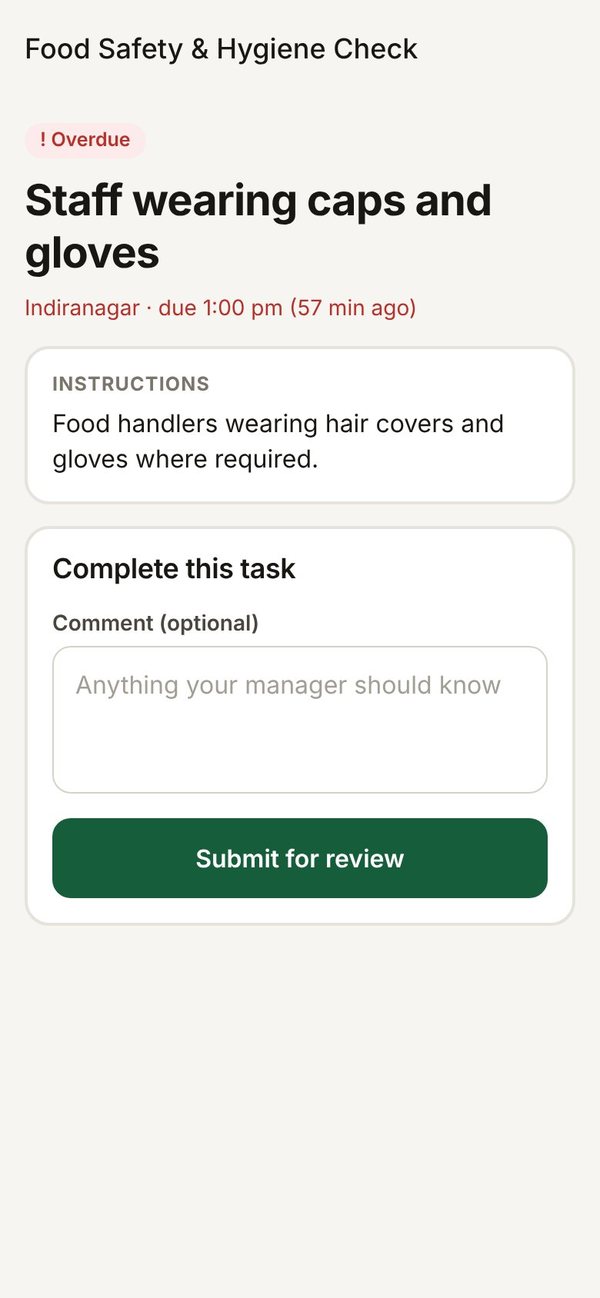
Staff sign in with the restaurant code, their phone number and a 6-digit PIN. No email needed. They see what's overdue, what's with the manager, and what opens later.

  • No signal in the cold room? Work is saved on the phone and sent when the signal returns
  • Managers approve from the floor without opening a laptop
  • Works in any phone browser; Android and iPhone apps are on the way
Staff task screen with instructions and Submit for review
Manager review list on the phone
Manager approving a photo taken with the in-app camera

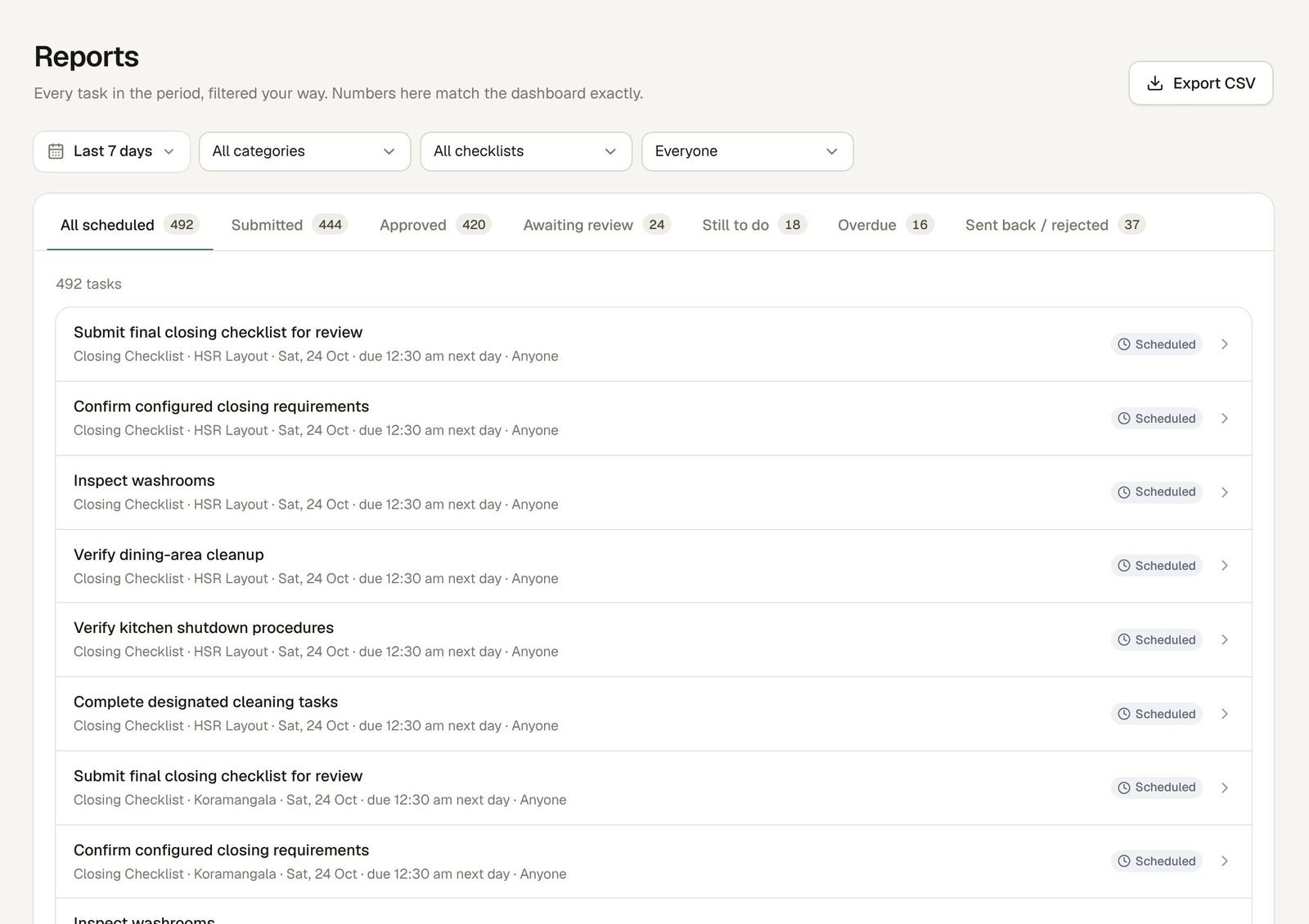
Reports that match the dashboard.

Every task in a period, filtered by category, checklist, person or status, with the same numbers as the dashboard. Export to CSV for your accountant, your auditor or your own sheets.

Reports · last 7 days
Reports for the last 7 days with tabs for scheduled, submitted, approved, awaiting review, still to do, overdue and sent back
Ready on day one

13 restaurant checklists, ready to use.

Use them as they are or change every task, time and rule. Editing a checklist never rewrites work already done.

Morning Opening ChecklistOpening · includes the morning puja
Morning PujaPhoto required · in-app camera only
Kitchen Readiness ChecklistKitchen preparation
Food Safety & Hygiene CheckFood safety & hygiene
Dining Area ReadinessDining area
Washroom CleaningWashroom
Housekeeping RoundHousekeeping
Staff Readiness BriefingStaff readiness
Equipment & Service ReadinessEquipment
Manager InspectionManager walk-through
Closing ChecklistClosing · runs past midnight
End-of-Shift HandoverHandover to the next manager
Festival & Special Event Set-upFestivals and events

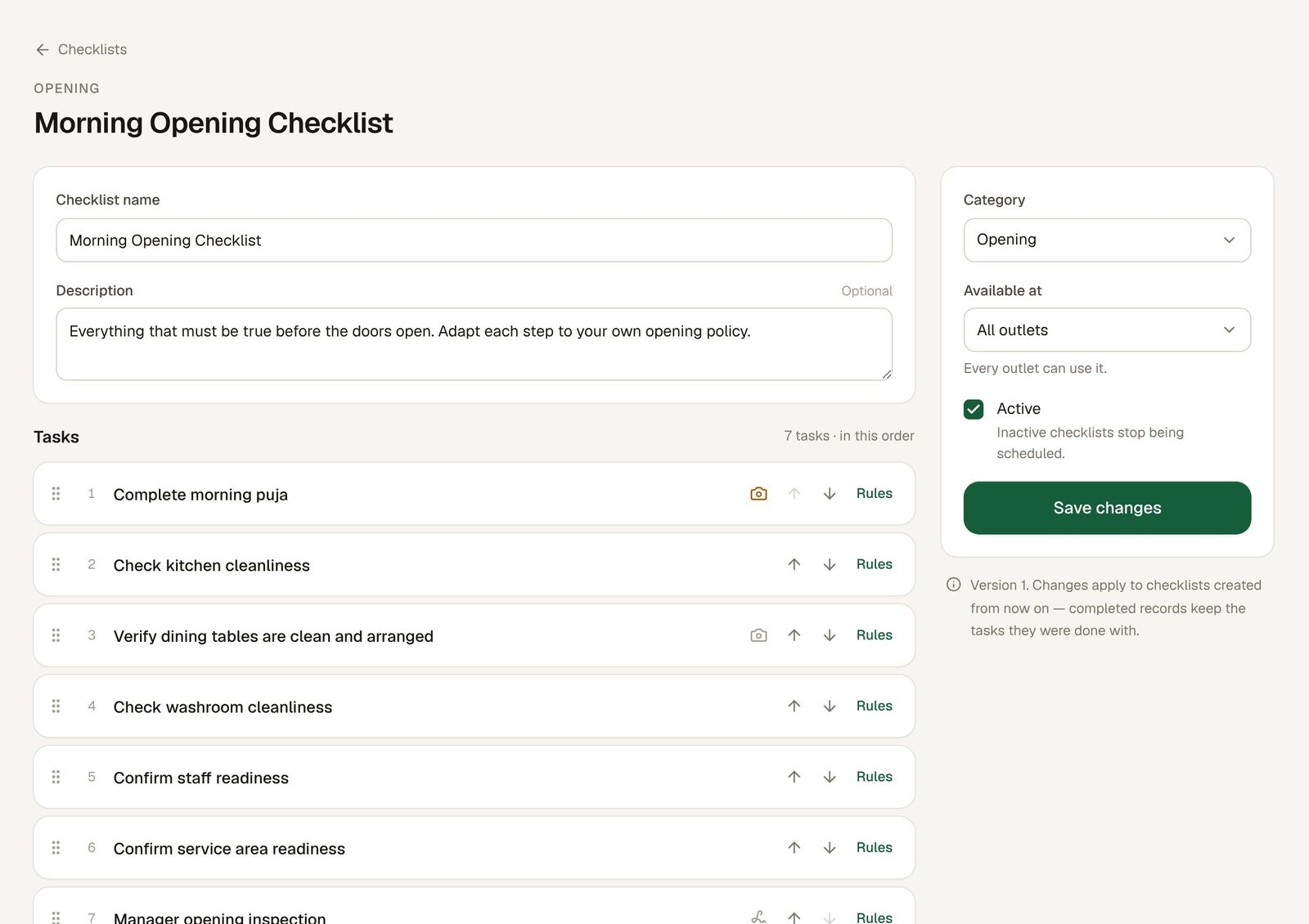
Your rules, task by task.

  • Mandatory or optional; photo required, optional or none; camera only
  • Comment required, or an "I confirm" acknowledgement before submitting
  • Assign to a person, a role at the outlet, or a team
  • Daily, selected weekdays, monthly or one-time, in each outlet's own time
Checklists · Morning Opening Checklist
Checklist editor showing the Morning Opening Checklist's seven tasks in order
Inspection-ready records

When the inspector asks, you have the record.

Food safety officers, auditors and owners all ask the same thing: show me. In Heard, every check carries a name, a time, the photo where one was needed, and its full history.

Kept, not edited

Submissions, approvals and send-backs are stored as a history that can't be quietly changed or deleted.

Any day, any outlet

Pull up a date range for one outlet or all of them in seconds, and export it to CSV.

Hygiene routines on a schedule

Food safety, washroom, housekeeping and manager inspection checklists run on time, every day, without reminders on WhatsApp groups.

SAT 24/10 · INDIRANAGAR · KITCHEN READINESS CHECKLIST ✓ Record cold-storage temperature display photo · in-app camera 10:14 AM PRIYA S. ✓ Approved 10:31 AM RAVI K. ✓ Hand-wash stations stocked 10:22 AM PRIYA S. Sent back: "Soap missing at station 2" 10:40 AM RAVI K. ✓ Resubmitted · attempt 2 · approved 10:58 AM RAVI K.
Trust

Your restaurant's data stays yours.

Separated at the database

Each restaurant's data is walled off from every other restaurant's inside the database itself, not just in the app.

Outlet by outlet

Staff and managers see only the outlets they work at. Every action is checked on the server.

Locked after wrong PINs

Repeated wrong PINs or passwords lock the account for 15 minutes. A manager can reset access.

Changes take effect at once

Disable someone or change their role and it applies on their very next tap.

FAQ

Questions owners ask.

Do my staff need an email address?

No. Staff sign in with your restaurant code, their phone number and a 6-digit PIN that you set. Managers and owners use email and a password.

Does it work on cheap Android phones and without signal?

It runs in any modern phone browser. If the signal drops, work is saved on the phone and sent when it comes back. Heard never shows a task as submitted until it has reached us.

Can staff upload an old photo instead of doing the task?

For tasks you mark "camera only", the gallery is not allowed. For other photo tasks, the reviewer sees whether the photo came from the in-app camera or the gallery, and the time we received it. A photo doesn't prove the work was done; a manager reviewing it is what makes it count.

Is Heard approved by FSSAI?

No. Heard is not certified or approved by FSSAI. It keeps your checklist records, with names, times, photos and history, so you can show what was done when someone asks.

How many outlets can I add?

As many as you run. Owners see all of them; managers and staff see only the outlets they're assigned to.

Can I change the checklists?

Yes. Change any task, time, photo rule or approval rule, or build your own from scratch. Past records keep the version they were done with.

What does it cost?

We're setting up our first restaurant groups now. Book a demo and we'll walk you through it with your own outlets and checklists.

See your outlets on one screen.

Tell us how many outlets you run and which checklists you use on paper today. We'll set them up in Heard and show you. WhatsApp, call or email, whichever is easier.

support@useheard.in Email us